Difference between revisions of "LQFP32"
From RoboWiki
m |
m |
||
| Line 11: | Line 11: | ||
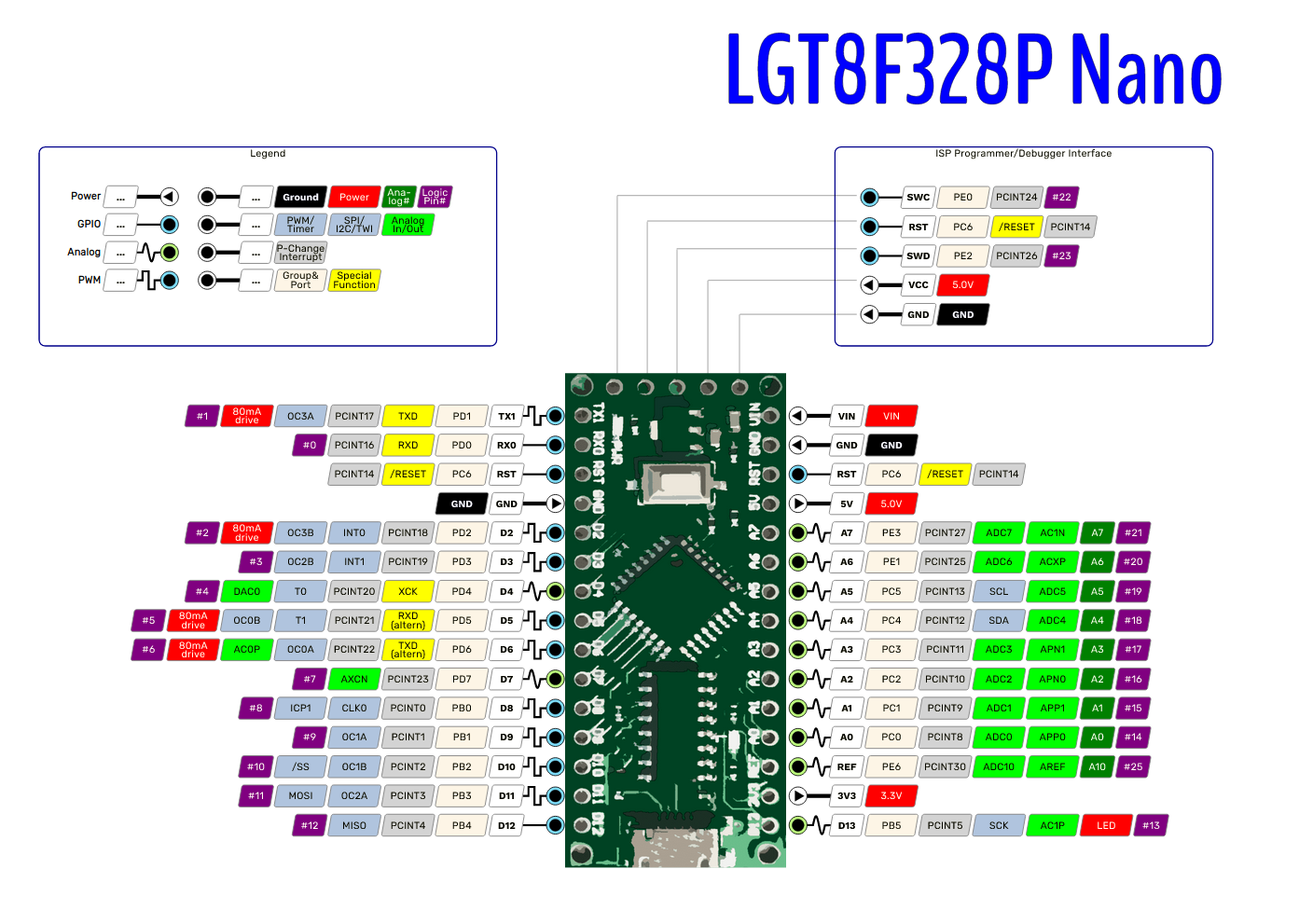
Pinout: [https://raw.githubusercontent.com/dbuezas/lgt8fx/master/docs/boards/pinouts/svg/LGT8F328P-nano.png pinout] | Pinout: [https://raw.githubusercontent.com/dbuezas/lgt8fx/master/docs/boards/pinouts/svg/LGT8F328P-nano.png pinout] | ||
| − | |||
| − | + | Supplementary material download: labels for boxes with pinouts: [[Media:pinouts.zip|pinouts.zip]] | |
| − | |||
| − | |||
| − | |||
| − | + | [[LQFP32 - programy]] | |
| − | |||
| − | |||
| − | |||
| − | |||
| − | |||
| − | |||
| − | |||
| − | |||
| − | |||
| − | |||
| − | |||
| − | |||
| − | |||
| − | |||
| − | |||
| − | |||
| − | |||
| − | |||
| − | |||
| − | |||
| − | |||
| − | |||
| − | |||
| − | |||
| − | |||
| − | |||
| − | |||
| − | |||
| − | |||
| − | |||
| − | |||
| − | |||
| − | |||
| − | |||
| − | |||
| − | |||
| − | |||
| − | |||
| − | |||
| − | |||
Revision as of 00:06, 25 October 2022
Exercises with LQFP32 Mini EVB
Configuration of Arduino IDE:
Connect the device to USB port, open device manager (WIN-X, and select Device Manager), open "Ports", check which serial port has been created for the device:

Pinout: pinout
Supplementary material download: labels for boxes with pinouts: pinouts.zip